
Product Registration


Step 1

Register at My Qeridoo

Don't have an account yet? It only takes 2 minutes.
Step 2

Enter serial number

Enter the serial number of your Qeridoo to link it to your account.
Step 3

Upload invoice

Upload your purchase invoice for verification.

Not registered yet?

Create your account now and unlock a wide range of benefits


Where can I find the serial number?
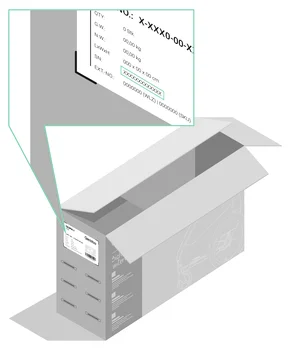
Packaging

Packaging

You can find the serial number on a sticker (product label) on the outer box of your Qeridoo. It is usually located on the smaller side of the box and also includes a small product image and further product details.
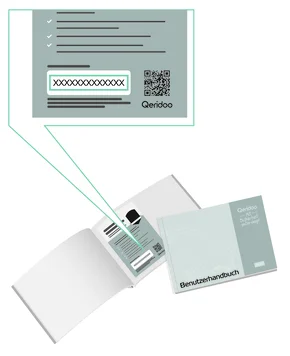
Warranty Card

Warranty Card

Every Qeridoo child sports stroller comes with a warranty card that contains warranty information and the serial number. If you can't find the card, just check the manual.
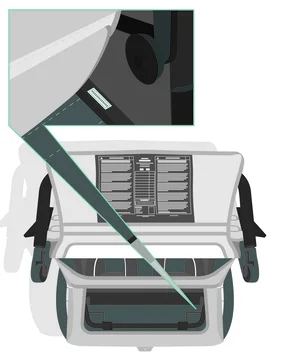
Frame / Body

Frame / Body

The serial number is also attached to the frame of your product. For the child bike trailer, look for it on the frame bars in the trunk area. The position may vary depending on the model.
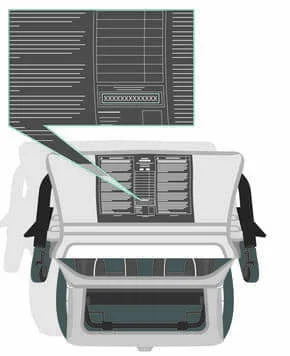
Warning Label

Warning Label

All our main products have warning labels attached. On your child sports stroller, you'll usually find it on the inside of the trunk flap. The serial number is also printed at the bottom center.

Product registration with a transfer code

What is the transfer code

The transfer code identifies you as the rightful new owner of a used Qeridoo product. You need it if you did not buy a Qeridoo new from a retailer but acquired it second-hand or received it as a gift.

The code makes sure that only actual owners can register a product, and it protects you and us from misuse of serial numbers.

If you bought the Qeridoo second-hand
Please ask the seller to carry out the following steps in their My Qeridoo account:

  1. Log in at qeridoo.de under “My account”.
  2. Click on “Registered products” in the menu on the left.
  3. For the product concerned, click on “Generate transfer code and release serial number”.
  4. Note down the transfer code displayed or capture it with a screenshot.
  5. Pass the code on to you together with the serial number.

You can then register the Qeridoo under “My account → Registered products → Add”. There, switch on “I have a transfer code” and enter the code.

Each serial number can only be assigned to one account. When a Qeridoo changes hands, the old link has to be removed and a new one created. The transfer code is the bridge between the previous owner and the new owner:

  • The previous owner withdraws their registration and receives the code in the process.
  • The previous owner passes the code on to you.
  • You register the product in your name using the serial number and the transfer code.

That way your extended warranty is retained even after a change of owner, within the scope of our goodwill policy.